
What is the best Camera for Videography: A Complete Buyer’s Guide
- Edmund Chong

- Jul 21, 2024
- 12 min read
Updated: Feb 4
Choosing the best camera for videography can feel overwhelming, especially with so many models, formats, and price points on the market. The reality is that there is no single “best” camera for everyone the right choice depends on how and what you plan to film.
Whether you’re creating YouTube content, shooting short films, documenting travel, or producing professional video work, Venture Studio will break down the key factors that matter most. We’ll look at camera types, essential features, budget considerations, and the best options for different videography styles so you can make a confident, informed decision.

Key Takeaways
Different videography projects require different camera capabilities |
Excellent video cameras are available at every budget level |
Mirrorless and DSLR cameras each have strengths and limitations |
Core features like sensor size, frame rates, and autofocus matter more than brand names |
Testing a camera before buying helps ensure it fits your shooting style |
Understanding Your Videography Needs
Before comparing specifications or brand names, the most important step is understanding how you intend to use the camera in real-world conditions.
The best camera for videography is not defined by technical specs alone, but by how well it supports your shooting style, workflow, and creative goals, all of which are central to Understanding the Art of Visual Storytelling in video production.
Videography covers a wide range of use cases. A vlogger filming alone needs fast autofocus, reliable stabilisation, and a lightweight setup. A filmmaker, on the other hand, may prioritise sensor performance, colour depth, and post-production flexibility. Travel videography introduces additional constraints such as size, durability, and battery life often requiring compromises between portability and image quality.

To narrow down your options, consider the following questions carefully:
Shooting style: Will you be filming mostly handheld, or using tripods, gimbals, or rigs? Handheld shooting places more importance on in-body stabilisation and lens support. |
Lighting conditions: Do you typically shoot in controlled environments, or in natural and low-light settings where sensor performance becomes critical? |
Mobility vs. image quality: Is quick setup and portability more valuable than achieving a cinematic look with larger sensors and heavier lenses? |
Post-production workflow: Will you be colour grading extensively, working with log profiles, or delivering fast turnarounds with minimal editing? |
Clarifying these factors early allows you to focus on cameras that genuinely fit your needs, rather than being distracted by features designed for use cases you may never encounter.
This approach not only saves money, but also results in a camera that feels intuitive, efficient, and aligned with how you actually create video.
Mirrorless vs. DSLR: Which Is Better for Videography?
When choosing the best camera for videography, the mirrorless vs. DSLR debate still comes up frequently.
Feature | Mirrorless Cameras | DSLR Cameras |
Design purpose | Built with modern video and hybrid shooting in mind | Originally designed for still photography |
Size & weight | Lighter and more compact, ideal for handheld shooting | Bulkier and heavier |
Autofocus (video) | Fast, accurate, and reliable for continuous video AF | Often slower and less consistent in video mode |
Video features | Strong support for high frame rates, log profiles, and modern codecs | Limited advanced video tools on many models |
Stabilisation | Frequently includes in-body image stabilisation (IBIS) | Usually relies on lens stabilisation only |
Viewfinder | Electronic viewfinder with real-time exposure preview | Optical viewfinder (not usable during video recording) |
Low-light performance | Generally excellent due to newer sensor technology | Good, but older sensor designs on many models |
Future support | Actively developed with frequent video-focused updates | Fewer new DSLR releases and slower innovation |
Best for | Vloggers, content creators, filmmakers, hybrid shooters | Photographers who occasionally shoot video |
Top Cameras for Different Videography Styles
Different videography styles place very different demands on a camera. Choosing the best camera for videography depends less on brand and more on how well a camera supports your specific shooting conditions, workflow, and creative goals.
Below is a breakdown of what truly matters for each major videography style.
Best Cameras for Vlogging
Vlogging is typically fast-paced and often filmed solo, which means the camera needs to work reliably without constant adjustment. Compact size, dependable autofocus, and strong audio support are essential.
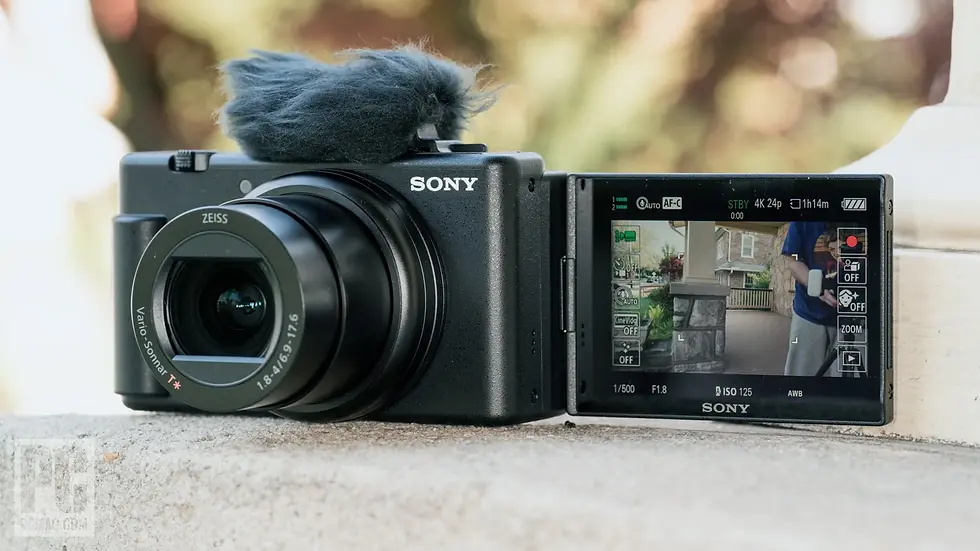
Cameras built for vlogging prioritise portability, intuitive controls, and features like flip-out screens and face-tracking autofocus, allowing creators to focus on storytelling rather than technical setup.
Sony Vlogcam ZV‑1M2 | One of the most popular vlogging cameras thanks to excellent autofocus, 4K video, flip-screen, and flavourful colour straight out of camera — ideal for solo creators. |
Panasonic Lumix G97 | Mirrorless all-rounder with strong video capability and lens flexibility that works well for vloggers and hybrid shooters. |
Kentfaith 8K Camera | Budget-friendly 8K capable camera with Wi-Fi and autofocus — great starter option for entry-level video creators. |
Digital Camera 4K for Vlogging | Compact and affordable camera that’s easy to carry and provides solid 4K video for casual vlogging. |
These cameras are especially well suited for daily content creation, social media video, and creators who need a lightweight, ready-to-shoot setup.
Ideal Cameras for Filmmaking
Filmmaking places a much heavier emphasis on image quality and post-production flexibility. Cameras in this category are designed to capture greater dynamic range, accurate colour, and detailed footage that holds up during colour grading.

Larger sensors, log profiles, and advanced recording formats are common, giving filmmakers more creative control over the final look.
Canon EOS C50 | Full-frame cinema camera designed for professional video work, excellent for narrative and commercial projects with high frame-rate support and robust recording tools. |
Panasonic Lumix S5 II | Full-frame hybrid that combines excellent video specs with versatility, making it a top choice for creative filmmakers. |
Panasonic Lumix GH5 / GH5S | Video-focused mirrorless cameras with strong codec support, ideal for independent filmmakers and documentary shooters. |
While these cameras often require a more involved setup, they are the preferred choice for narrative projects, commercial work, and high-end video production.
Top Picks for Travel Videography
Travel videography demands a balance between performance and practicality. Cameras need to be lightweight, durable, and easy to carry, while still delivering consistent video quality across a wide range of lighting and environments.

Built-in stabilisation is particularly important, as travel footage is often shot handheld and on the move.
Sony RX100-series (e.g., RX100 VII) | Premium compact that fits in your pocket while offering impressive zoom and 4K video quality on the go. |
Canon PowerShot V1 | Portable content-creator camera with built-in zoom and stabilisation, works well for travel shooting without interchangeable lenses. |
Sony Alpha a6700 | Versatile APS-C mirrorless camera that balances performance, size, and high-quality video for travel content. |
These cameras are ideal for creators who prioritise mobility and versatility, allowing them to capture high-quality video without being weighed down by heavy gear.
Essential Features to Look for in a Video Camera
When choosing the best camera for videography, it’s important to look beyond brand names and headline specifications. The features that matter most are the ones that directly affect image quality, shooting reliability, and workflow efficiency in real-world conditions.
Key features to prioritise include:
Sensor size | Larger sensors generally perform better in low-light situations and offer greater control over depth of field, allowing for a more cinematic look. |
Frame rates | Support for higher frame rates enables smooth slow-motion footage and greater creative flexibility during editing. |
Autofocus system | Fast, accurate autofocus is especially critical for moving subjects, run-and-gun shooting, and solo creators who cannot manually adjust focus while filming. |
Image stabilisation | In-body or digital stabilisation helps minimise camera shake, making handheld footage smoother and more professional-looking. |
Video formats and codecs | Advanced codecs and bit-depth options provide more flexibility in post-production, particularly for colour grading and professional editing workflows. |
Together, these factors have a far greater impact on practical videography performance than resolution alone.

A well-balanced camera with strong fundamentals will consistently outperform a higher-resolution model that lacks these core capabilities.
Best Budget Cameras for Videography
Creating high-quality video doesn’t require a high-end setup. Many budget-friendly cameras now deliver features that were once limited to professional models, including 4K video recording, reliable autofocus, and effective stabilisation.
These cameras are well suited for beginners, hobbyists, and small creators who want dependable performance without a large upfront investment. While they may lack some advanced controls found in premium models, today’s entry-level and mid-range options are more than capable of producing sharp, stable footage for everyday videography, content creation, and online platforms.

For creators who are just starting out or working within a limited budget, these cameras offer an excellent balance between cost, usability, and real-world video quality.
High-End Cameras for Professional Videographers
High-end cameras are designed for creators working in demanding production environments where image quality, reliability, and workflow control are critical.
These cameras go beyond basic video capture, offering tools that support complex shoots, professional colour grading, and consistent results across different projects. While they come at a higher price point, they are built to meet the expectations of commercial, cinematic, and client-facing work.

Premium Features to Consider
High-end video cameras typically offer a wider dynamic range, allowing more detail to be preserved in both highlights and shadows. Higher bit-depth recording enables smoother colour transitions and greater flexibility during colour grading, while advanced colour science ensures accurate and consistent results straight out of the camera.
Many professional models also include built-in monitoring tools such as waveform displays, false colour, and timecode support, all of which streamline on-set workflows.
Best High-End Models
Professional videographers often select cameras based on how well they integrate into their existing workflow rather than on specifications alone. Some models prioritise high resolution and fast frame rates for cinematic visuals and slow-motion work, while others focus on colour accuracy, codec efficiency, and post-production flexibility.
The best choice depends on the type of projects being produced and the demands of the final deliverables.
Is It Worth the Investment?
Investing in a high-end camera makes sense when your work requires consistent professional output, reliable performance under pressure, and extensive post-production control. For client projects, commercial productions, or narrative filmmaking, the benefits often justify the cost.
However, for many creators, today’s mid-range cameras already provide more than enough capability, making them a more practical and cost-effective choice.
Hybrid Cameras: The Best of Both Worlds
Hybrid cameras have become an increasingly popular choice for creators who need versatility without maintaining separate setups for photography and video.
Designed to perform well in both disciplines, these cameras strike a practical balance between image quality, video features, and everyday usability.
What Is a Hybrid Camera?
A hybrid camera is built to handle both still photography and videography at a high level. Rather than specialising exclusively in one area, it combines strong photo capabilities with advanced video features, making it a flexible tool for creators who regularly switch between shooting formats.

Advantages of Hybrid Cameras
Hybrid cameras offer several key benefits:
Dual-purpose performance | Well suited for both photography and video work without major compromises. |
Advanced autofocus and stabilisation | Reliable subject tracking and smoother handheld footage across shooting styles. |
Greater portability | More compact and lightweight than dedicated cinema camera setups, making them easier to use on location. |
Top Hybrid Options
Hybrid models are particularly popular among content creators, freelancers, and small production teams who handle a mix of photo and video projects.
Sony Alpha a7 III Mirrorless Camera | A well-rounded full-frame mirrorless that excels in both still photography and video, with reliable autofocus and strong low-light capability, ideal for hybrid creators. |
Canon EOS R50 Mirrorless Camera | Compact and user-friendly, this is a great choice for creators who want excellent 4K video and good photo quality in a lightweight package. |
Canon EOS R10 Mirrorless Camera | Another strong hybrid pick from Canon, balancing image quality, autofocus, and video performance for both casual shooters and content creators. |
FUJIFILM X100V Digital Camera | Premium compact with excellent still image quality and capable 4K video, great for storytellers who want a stylish, pocketable hybrid. |
Panasonic Lumix S1H Mirrorless Camera | A powerful full-frame hybrid with advanced video features, ideal for creators who demand professional video quality alongside stills. |
Their flexibility allows users to adapt quickly to different creative demands while keeping gear requirements simple and efficient.
Essential Accessories for Videography
Even the best camera for videography can only perform as well as the equipment supporting it. In many cases, the right accessories have a greater impact on overall video quality than upgrading the camera body itself.
Key accessories to consider include:
External microphones | Clear, high-quality audio is just as important as sharp visuals. An external mic dramatically improves sound compared to built-in camera microphones. |
Tripods or gimbals | Proper stabilisation ensures smoother footage, whether you’re shooting static scenes, interviews, or moving shots. |
Extra batteries and storage media | Videography consumes power and storage quickly, so having backups prevents interruptions during shoots. |
ND filters | Neutral density filters allow you to control exposure in bright conditions while maintaining cinematic shutter speeds. |
Investing in these accessories enhances reliability, consistency, and production quality often delivering a more noticeable improvement than switching to a newer camera alone.
Choosing the Right Video Editing Software
Post-production is where your footage truly comes to life. The right editing software should not only support your camera’s formats and codecs, but also match your skill level, workflow preferences, and creative goals.
Whether you’re just starting out or working on professional projects, there’s a tool built for you.
Best Video Editing Software for Beginners
These options are user-friendly, forgiving, and ideal for creators who want to edit quickly without a steep learning curve:
Adobe Premiere Elements | Simple interface and guided edits make it easy to assemble polished videos without complexity. |
iMovie (Mac/iOS) | Intuitive drag-and-drop workflow with essential tools for trimming, transitions, and basic colour adjustments. |
Clipify / Filmora | Affordable and accessible editors with ready-made effects, titles, and presets for social video creators. |
Why choose beginner software?
They prioritise clarity over complexity, letting you edit confidently without being overwhelmed by advanced features.
Best Video Editing Software for Intermediate Creators
If you’re ready to take your storytelling further with more control, these tools strike a strong balance between power and usability:
Adobe Premiere Pro | Industry-standard editing with excellent format support, robust timeline tools, and seamless Adobe ecosystem integration. |
DaVinci Resolve (Free & Studio) | Professional-level colour grading and editing, the free version alone is incredibly capable. |
Final Cut Pro (Mac) | Fast performance, magnetic timeline, and strong support for multicam and large projects. |
Why intermediate editors choose these:
They offer greater control over effects, audio, colour correction, and timeline precision ideal for creators growing their skills.
Best Video Editing Software for Professionals
These platforms deliver deep control and flexibility, perfect for clients, commercial work, and advanced workflows:
Avid Media Composer | Trusted by film and TV editors for collaborative editing and large, complex productions. |
DaVinci Resolve Studio | Combines professional editing, studio-level colour grading, Fusion visual effects, Fairlight audio mixing, and collaborative tools in one suite. |
Adobe Premiere Pro + After Effects | A powerful combo for editors who also need motion graphics, compositing, and advanced visual effects. |
Why pros invest here:
These tools handle heavy workflows, high-resolution footage, advanced effects, and nuanced audio work, essential in professional post-production.
Step-by-Step Checklist: How to Test and Compare Video Cameras
Use this checklist when testing a camera in-store, during a rental, or on a trial shoot. It focuses on real-world performance rather than specifications alone.
Step 1: Test Low-Light Performance
Record short clips in dim lighting or indoor conditions.
Check how much noise appears in shadows ✅ |
Observe whether colours remain accurate or start to break down ✅ |
Compare footage at higher ISO settings ✅ |
✔ A good video camera should retain usable detail without excessive noise.
Step 2: Check Autofocus Accuracy
Film a moving subject or walk toward the camera while recording.
Does the camera maintain focus smoothly? ✅ |
Are focus transitions natural or abrupt? ✅ |
Does face or eye tracking remain locked on the subject? ✅ |
✔ Reliable autofocus is critical for solo shooting and moving scenes.
Step 3: Evaluate Colour Rendering
Shoot a short clip of skin tones and everyday objects.
Do colours look natural straight out of camera? ✅ |
Are skin tones consistent across different lighting? ✅ |
Does footage match your editing style (neutral vs contrasty)? ✅ |
✔ Good colour rendering reduces time spent correcting footage in post.
Step 4: Test Audio Quality
Record a short spoken clip using the built-in microphone.
Is dialogue clear and usable? ✅ |
Is there noticeable background noise or distortion? ✅ |
Test external mic input if available ✅ |
✔ Audio quality can make or break video, don’t overlook this step.
Step 5: Assess Handling and Controls
Hold the camera as if you were filming for an extended period.
Are buttons easy to reach while recording? ✅ |
Is the grip comfortable and well-balanced? ✅ |
Can you change key settings quickly without stopping recording? ✅ |
✔ A camera that feels intuitive will speed up your workflow.
Step 6: Review Menu Layout and Settings
Navigate the menus without referring to a manual.
Are video settings easy to find? ✅ |
Is the menu logically organised? ✅ |
Can you customise shortcuts or function buttons? ✅ |
✔ A clean menu system reduces frustration during real shoots.
Step 7: Compare Footage Side by Side
Review clips from different cameras on the same screen.
Compare sharpness, colour, and stabilisation ✅ |
Note differences in noise, motion handling, and autofocus behaviour ✅ |
✔ Side-by-side viewing highlights differences that specs don’t reveal.
If possible, rent or borrow a camera before buying. Even a short real-world test can quickly show whether a camera fits your shooting style and workflow better than reading reviews alone.
Choosing a Camera That Grows With You
Finding the best camera for videography isn’t about chasing a single “perfect” model it’s about choosing a tool that aligns with your creative goals, shooting style, and workflow.
By clearly understanding how you film, focusing on features that genuinely matter and setting a budget based on real needs rather than hype, you can make a decision with confidence.

The right camera should support your work today while leaving room to grow as your skills and projects evolve. Contact us now for more detail and services needed!


Comments